Hi All,
A reminder that the end of the month is fast approaching so get snapping.
I know some of you have done it just not posted so come one get the cable out and download of the camera. (If you got time to download the latest eddition of Grays Anatomiy you can download your shots !)
Also on a personal note I'd also ask a everyone to join in the critique ;-)
I'd much rather have 20 hard critique comments than one "nice shot".
You don’t have to know all the technicalities but we all know some of the basics and more importanly what we like.
For example I posted an underwater shot this month, you don’t have to know about diving or underwater housings and strobes but is it sharp ? Is it a bulls eye ? or does the diaganal line off set that ? what are the colours like ? negative space ? aspect ratio ? etc..
Here is a good guide if anybody wants pointers.
http://news.deviantart.com/article/70348/
The opposite also works as well if somebody likes a shot and wants to know how it was done etc the idea is to share and learn.
p.s. I know sometimes people just post snaps because they want to so if anybody doesn’t want critque on a certain image just add a note in the post.
Cheers,
Richard B.
Thursday, November 19, 2009

Monday, November 16, 2009
Photoshop trick
Hi All,
Nice simple trick to give your photos a bit of punch.
They say with divers, there are two sorts of divers, those that pee in there wet suits and those that lie about it. Photoshop and Photographers is the same so this tip is for all those that lie ;-)
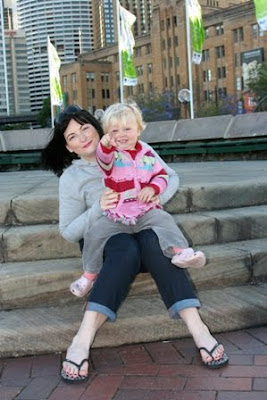

1- Duplicate the background layer.
2- Set blending mode to soft light.
3- Adjust the opacity as you like (about 50% is a good start).
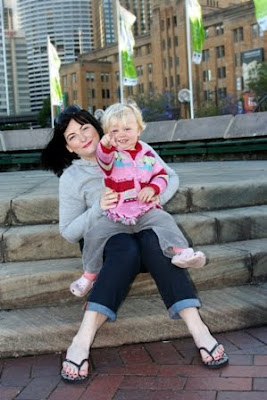
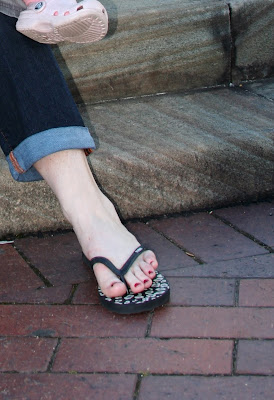
Nice subtle way to boost the saturation and tonal range.
You almost have to look hard for the difference, its more of an impression, however check out the gray and the texture of the steps. (If need be right click and save the cropped shots to your desk top and flick between.)
There is no other adjustment between these two photos, NO levels, NO curves, NO dodge/burn.
For those who have a lot of photos to work with it's a very quick step and can even be added into your default actions.
The blending modes in photoshop are very clever and worth playing with. Soft light as here mutiplies light tones and dark tones together from the different layers to subtly lighten the lights and darken the darks.
p.s. This photo is not finished, jsut used like this for ilustration.
Coments, critique, abuse and questions welcome.
Cheers,
Richard B.
Nice simple trick to give your photos a bit of punch.
They say with divers, there are two sorts of divers, those that pee in there wet suits and those that lie about it. Photoshop and Photographers is the same so this tip is for all those that lie ;-)
Orignal

1- Duplicate the background layer.
2- Set blending mode to soft light.
3- Adjust the opacity as you like (about 50% is a good start).
After Post

Nice subtle way to boost the saturation and tonal range.
You almost have to look hard for the difference, its more of an impression, however check out the gray and the texture of the steps. (If need be right click and save the cropped shots to your desk top and flick between.)
There is no other adjustment between these two photos, NO levels, NO curves, NO dodge/burn.
For those who have a lot of photos to work with it's a very quick step and can even be added into your default actions.
The blending modes in photoshop are very clever and worth playing with. Soft light as here mutiplies light tones and dark tones together from the different layers to subtly lighten the lights and darken the darks.
p.s. This photo is not finished, jsut used like this for ilustration.
Coments, critique, abuse and questions welcome.
Cheers,
Richard B.
Animals - Richards efforts II
Hi All,
While the whales were submitted this month they weren't quite shot this month so here is one taken this month.

While the whales were submitted this month they weren't quite shot this month so here is one taken this month.
Clowning around in Musandam
EXIF :-
Canon 350D
Sigma 17-70mm Macro at 70mm
f5.6 (full open for this lense at that length)
1/200 (Max sync speed as lot of water movement)
2xDS125 strobes in eTTL
Not much PP, almost none by my standards ;-)
and in Honor of Steven's aspect ratio's I've not gone 4x6 but I do feel dirty.
Coment, Critque and abuse welcome.
Cheers,
Richard B.
Sunday, November 15, 2009
animals-cows-week-ii
Not normally wanting to fiddle with another mans cow without permission I couldn't help having a play with Paul's larger one. I reckon with a different crop the 'story' is told much better:

Rather than the shot showing a cow isolated in a shot I think the wide crop kind of tells the story of a solitary cow brooding on its own.......perhaps wondering why the dickins its in a desert under a tree and not in a green pasture.
Also the left hand bush balances nicely on the top left third with the cow on the bottom right. Maybe if it was my shot rather than a quick crop and re-post I'd also clone out the bottom of the tree in the middle back ground but that's by the by.
Paul - hope you don;t mind me having a fiddle with your cow.

Also the left hand bush balances nicely on the top left third with the cow on the bottom right. Maybe if it was my shot rather than a quick crop and re-post I'd also clone out the bottom of the tree in the middle back ground but that's by the by.
Paul - hope you don;t mind me having a fiddle with your cow.
Animals: Cows week II
 Nikon D70s
Nikkor 18-200 @ 29mm F/16
1/180 sec
I took some of Richard's comments and redid the image. This time you can see the whole of the tree's shadow, emphasising its isolation. I tweaked the cows' brightness using the Mask tool in PS Elephants 2.0 so that the cows were rendered a little brighter without blowing out the detail of the sand and the blue sky.
Less tweaking of the palette this time. See how the sand is redder?
Friday, November 13, 2009
Animals: Cows week
 Nikon D70s
Nikkor 18-200 @150mm and F/16
1/125 sec
There were plenty of animals out and about during last Friday's Gulf News Fun Drive rehearsal. Unfortunately most were camels, and I cannot in all conscience post a picture of a camel here, no matter how cute the young might allegedly be. There was also one sheep; someone had clearly got the flock out of there.
Anyway, here it is: two cows on the roadside, sharing what little shade is available. I have tried to tweak up the brightness so that the animals aren't in silhouette, but the background tends to blow out when I do that. I messed with the colour palette too. In the original the sand is redder, but I think this one is more pleasing to the eye. Oh, and I cropped the background crap out of the image and, as usual, reduced it to 800x600 for the InterTubes.
Tuesday, November 10, 2009
Animals - Doing what a cat does best.
First offering on the animals front, a shot of our cat doing what cats do best.......if best is indicated by what they do most.


I'm reasonably pleased I managed to find a time when she was willing to sit still long enough for me to take a few shots playing with the exposure etc until I got this shot I liked where tinky's fur is nicely exposed and her wiskers in focus without loosing the soft warmness of the sunlight coming in through the window (which Tinky loves so much).
EXIF data.....erm........f3.2, Tv=1/250, ISO 200, FL=31mm.
Subscribe to:
Posts (Atom)

 Posts
Posts

